A Gamified Habit Tracker in Google Sheets That Finally Made My Habits Stick
A while back I built myself a plain habit tracker spreadsheet, nothing fancy, just rows, dates, and checkboxes. It's still one of the most useful things I own, and I still run a version of it today for most of what I track.
What I kept wondering, though, was what the same daily habit would feel like with a bit more pull behind it, the kind of pull that keeps me coming back to a game long after the novelty wears off.
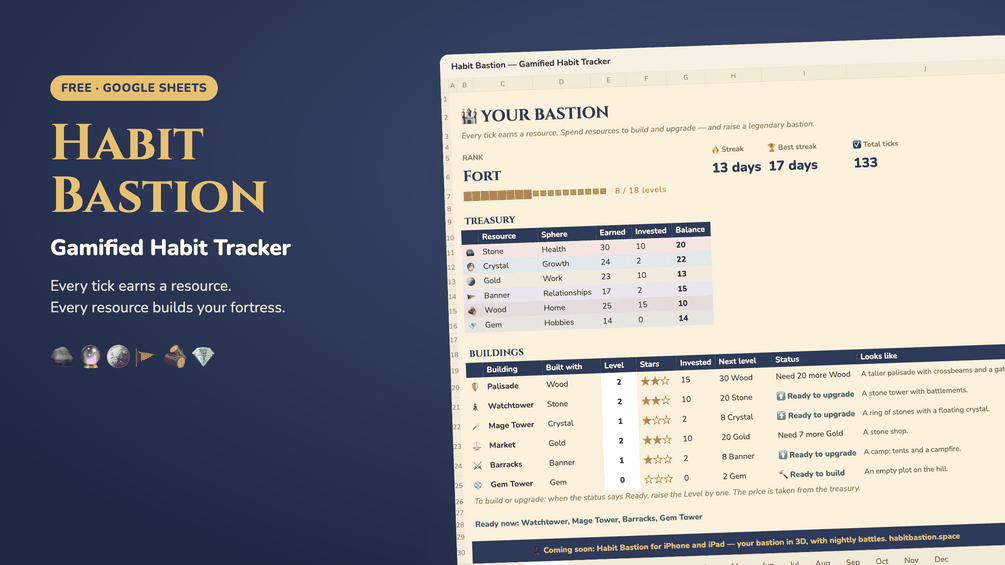
So I built a second version alongside it: a gamified habit tracker google sheets template built around earning resources and slowly building a small fortress, for the habits and the days where a plain checkbox could use a little extra pull.
The base version is a gamified habit tracker free download, built as a gamified habit tracker google sheets template free file, which is really just another way of saying a google sheets habit tracker you copy once and reuse every month.
Why I Wanted to Add a Game Layer, Not Replace My Habit Tracker Spreadsheet
A habit tracker spreadsheet is honest in a way that works well for a lot of habits, and for a lot of people. You either checked the box or you didn't. There's no spin, no excuse hiding in the data, and for plenty of habits that's genuinely all it takes.
For a few specific habits, though, I wanted something with a bit more built-in pull, the kind that makes opening the sheet feel like progress in the moment, not just in hindsight. That's not a flaw in the plain version. It's just a different kind of motivation, and depending on the day, I reach for one or the other.
How I Turned a Habit Tracker Into a Game
The idea came from noticing how much more consistent I was with games that gave me something to show for small, repeated actions, even boring ones. So I built a second tracker around that same loop, layered on top of the plain grid rather than replacing it.
How the Bastion Mechanics Actually Work
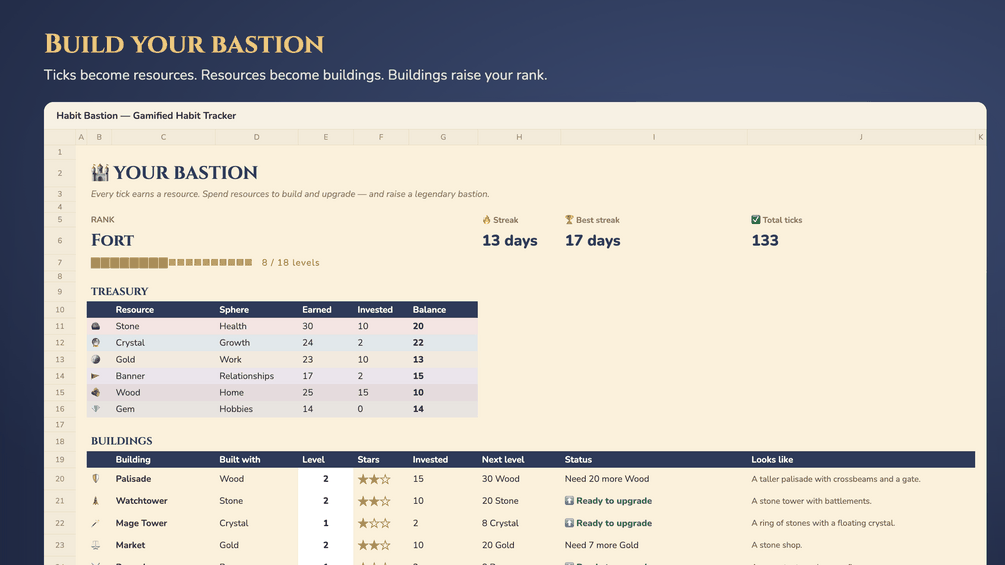
Every day you tick a habit, you earn a resource. Resources go toward buildings inside a small fortress that grows as the month goes on. Enough buildings, and you move up in rank.
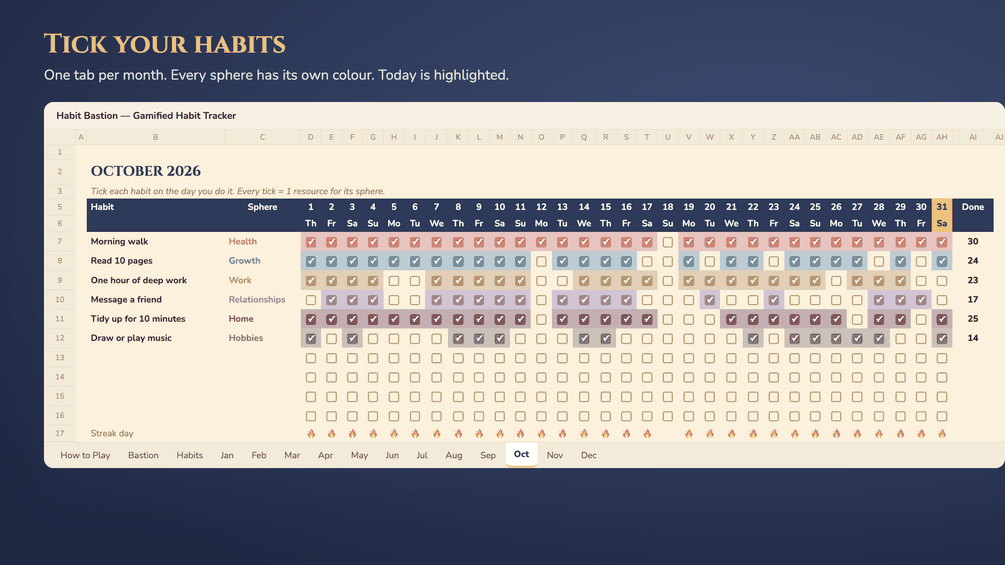
- Daily checkboxes feed a resource pool instead of just marking a day complete
- A streak tracker and a progress bar show how close you are to the next building or rank, the same idea as a google sheets habit tracker with progress bar built in from the start
- Monthly tabs reset the fortress layout so a rough month doesn't permanently bury a good one
- Levels and ranks give the whole thing a sense of direction, not just a running total
None of it changes what a habit tracker is supposed to do. It just gives the same daily checkbox a reason to feel like it matters that day, not just in hindsight. The whole point of the mechanics is simple: build a fortress one checked habit at a time, and let the habit tracker dashboard show the result at a glance.
How to Make a Habit Tracker in Google Sheets
If you want to build something like this yourself rather than use mine, the actual mechanics of how to make a habit tracker in google sheets are simpler than the final result looks. The same steps answer how to make a daily habit tracker in google sheets too, since a daily version is just this approach applied to one habit at a time.
- Set up one tab per month, with a row for each habit and a column for each day
- Add a simple formula that counts consecutive checked days to build your own streak tracker
- Turn that count into a progress bar using conditional formatting instead of a plain number
- Decide what a "resource" means for you, points, stars, anything you can total up
- Set thresholds where enough resources unlock a new rank, tab color, or small reward
That's the short version of how to create your own habit tracker in google sheets. Learning how to make an advanced habit tracker in google sheets, with branching ranks and multiple resource types, took me a few weekends of trial and error, which is exactly why I turned mine into a free habit tracker template google sheets users can copy instead of rebuilding from scratch. If you just want a habit tracker google sheets template free right now instead of building one from scratch, that's exactly what the free tier is for. You make a copy in a few seconds, there's no app needed, and the free download sits entirely in your own Google Drive.
How to Gamify Your Life, Not Just Your Habits
Figuring out how to gamify habit tracking, or how to gamify habits more generally, taught me something that applies more broadly than I expected about how to gamify your life in general. The pattern that worked for habits, small actions, visible resources, a sense of rank, holds up for almost anything repetitive. It's really just lightweight gamification applied to a part of life that's usually left completely manual.
People asking how to gamify your life adhd are usually chasing the same thing I was: a way to make a boring repeated action feel like it's going somewhere in the moment, not just on a chart you check once a week. A plain checklist asks for willpower every single day. A system that hands back something small and visible asks for a lot less. A lot of what's written about habits for adhd comes back to the same core idea, external structure that doesn't rely purely on memory or motivation.
I wouldn't call any of this self improvement in the dramatic sense. It's closer to removing friction from a decision you were already planning to make anyway, which happens to be most of what real productivity gains actually look like.
Is This a Habitica Alternative?
I'd already tried apps like Habitica before trying to gamify habit tracker spreadsheets myself, and the honest comparison depends on what you actually want out of it.
- A gamified habit tracker google sheets template keeps your data in your own Google Drive, not someone else's server
- There's no account to create and no app to install, the sheet itself is the whole tool
- A rpg style habit tracker built in Sheets is easy to reshape, rename, or extend once you understand the formulas behind it
- An app usually looks more polished out of the box, with more built-in animation and sound
If you're specifically looking for the best habitica alternative that you can fully customize yourself, a habit tracker game built in a spreadsheet gives you more control, even if it asks a little more of you upfront to set the first version up.
What to Actually Track in a Gamified Habit Tracker
What to track on a habit tracker matters more than how fancy the mechanics look underneath it. I kept my own list short on purpose.
- Movement, something as small as ten minutes counts
- One piece of real work I tend to avoid first thing in the morning
- Sleep, tracked simply as on time or not, nothing more detailed than that
- A habit streak for anything I'm specifically trying to rebuild that month
A digital habit tracker google sheets setup makes it easy to add or drop a habit without redesigning anything, which a daily habit tracker google sheets layout should let you do without much friction. I'd rather track four things honestly than ten things I quietly stop updating by the second week.
Why I Keep Coming Back to This habit tracker spreadsheet
Figuring out how to stay consistent with habits turned out to have less to do with discipline than I originally assumed, and more to do with whether the tool itself gave me a reason to show up.
How to build habits that stick, in my experience, usually comes down to making the daily action feel different from a chore, even slightly. That's the entire reason the resources and ranks exist in my version at all.
Should i use a habit tracker in the first place? That's roughly the question I kept circling back to before building this version, and my honest answer is that the tracker matters less than whether you'll actually open it on a bad day. I still open the same gamified habit tracker google sheets template most mornings, mostly because watching the fortress grow gives today's checkbox a reason to matter today, not just in a month's worth of hindsight.
FAQ
How to use a habit tracker effectively?
Pick a small number of habits, check them off daily without judging the days you miss, and review the pattern weekly instead of grading yourself every single day.
How to use a monthly habit tracker without losing momentum?
Treat each month as its own fresh tab or page. A rough week shouldn't carry negative weight into the next month, it should just end and let a new one start clean.
What's the difference between a habit tracker game and a regular tracker?
A habit tracker game adds a layer of resources, ranks, or rewards on top of the same daily checkbox, so progress feels visible in the moment instead of only in hindsight.
Is a gamified habit tracker google sheets template actually free?
Yes, the base version is a free habit tracker template google sheets file you copy into your own Drive, no account or payment required to use the core tracker.
What makes a rpg habit tracker different from a to-do list?
A to-do list disappears once a task is done. A rpg habit tracker keeps a running record of resources and rank, so yesterday's effort is still visible and still counts toward something today.